

Most indie products start with no budget and no audience. Paid keyword tools feel out of reach, and a lot of founders skip search for that reason. They shouldn't. You can run solid keyword research for free, and the best data source is one you may already own.
That source is Google Search Console. It shows the real searches that already lead people to your site. Add a few free habits on top, and you have a repeatable system you can run in an hour a week.
Here is the full method, step by step.
Start with how people actually search
Before you open any tool, write down what your customer types when they have the problem your product solves. Don't use your own product words. Use theirs.
The Google SEO Starter Guide makes this point directly. It tells site owners to think about the words users would type, and it notes that experts and beginners often use different terms for the same thing. A cheese shop might say "charcuterie," while a shopper searches "cheese board."
For a founder, the gap is wider. You know the jargon. Your buyer does not. So write the problem in a sentence a friend would say out loud.
Make a list of 20 phrases. Mix three kinds:
Problem phrases, like "invoice late payments."
Question phrases, like "how to chase an unpaid invoice."
Comparison phrases, like "invoice tool vs spreadsheet."
Don't filter yet. Just get them down. This list is your seed.
Use Google itself as a free tool
Type each seed phrase into Google and look at what appears. Three spots give you free ideas:
Autocomplete. The suggestions under the search bar come from real queries.
People also ask. This box shows related questions that real users raise.
Related searches. These sit at the bottom of the results page.
Copy anything that looks relevant. Also read the top five results. Note the format. Are they guides, lists, tools or product pages? That tells you what searchers expect to find.
This step is free, fast and often more useful than a number from a tool, because you see what Google considers a good answer.
Set up Search Console
If your site is live, set up Search Console now. It is free. The Starter Guide recommends it as the first step to monitor how your site does in Google Search.
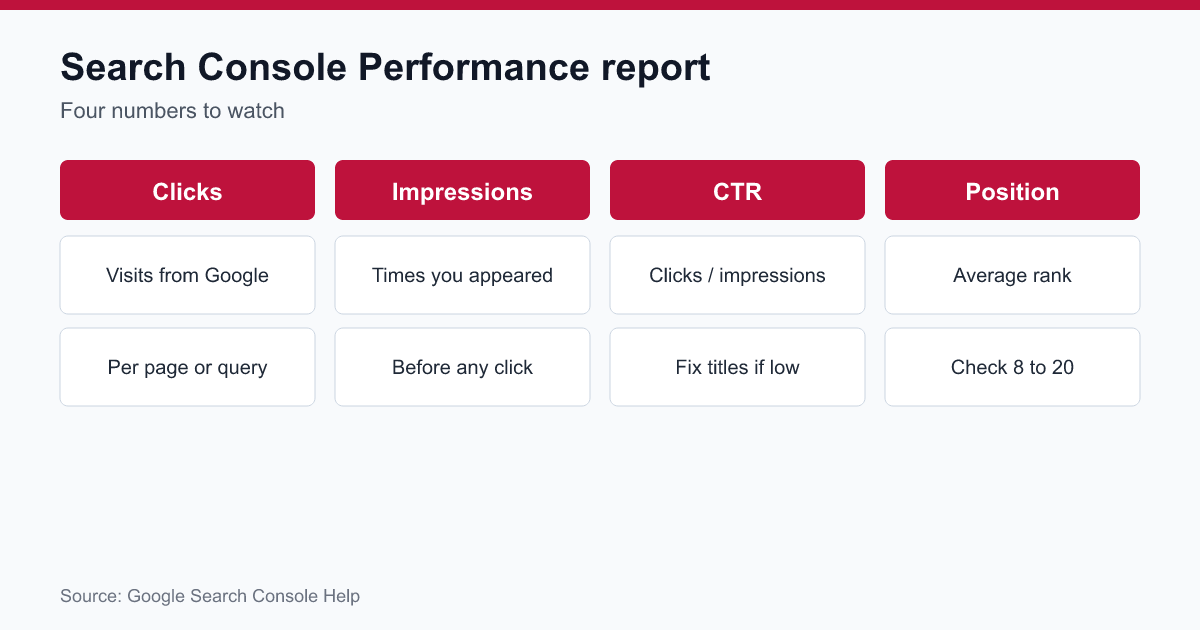
Once data starts to flow, the Performance report is your main keyword research tool. According to Google's help page for the report, it shows clicks, impressions, click-through rate (clicks divided by impressions) and average position. You can break it down by queries, pages, countries and devices.
The default view shows the past three months. You can change the date range as needed.
Don't expect instant results. The newest data can still change, and the Starter Guide says it may take from a few hours to several months for changes to appear. Give a new site a few weeks before you read much into the numbers.
Mine your queries for hidden wins
Open Performance and click the Queries tab. Now sort and filter. You are looking for three kinds of rows.
1. High impressions, low clicks. People see your page but don't click. Your title or description is probably weak. Fix those first. A better title can lift clicks without any change in rank. Google's guidance on title links is a good starting point.
2. Positions 8 to 20. These pages sit near the edge of page one. A small push can move them up. Add a section that answers the query better, improve the internal links, or refresh the content.
3. Queries you didn't plan for. You will often find odd phrases that bring in visitors. Each one is a clue about how people describe the problem. Write a new page for the best ones.
Keep one note. Search results vary by the searcher's place, device and history, so you may not see your site for a query you find in the report. That is normal. Treat the data as a guide, not a fixed truth.
Group keywords by intent
A list of phrases is not a plan. Sort each one by what the searcher wants.
Learn. "What is churn rate." Best for blog posts and guides.
Compare. "Tool A vs tool B." Best for comparison pages.
Solve. "Fix duplicate invoices." Best for how-to posts and help pages.
Buy. "Invoice software for freelancers." Best for your product or landing pages.
Match the page type to the intent. If you put a sales page against a "what is" query, it will struggle. If you put a long guide against a "buy" query, you may attract readers who never convert.
Early on, buy and solve phrases usually pay off fastest. They bring fewer visitors, but those visitors are closer to a decision. Learn phrases build trust over time.
Pick keywords you can win
With no budget and a young site, you can't beat big brands on broad terms. Don't try. Pick narrow phrases where the top results are weak.
Look at the first page for each phrase and ask:
Are the top results old, thin or off-topic?
Are there forum threads or tiny sites ranking? That is a good sign.
Can I add something the others lack, like a real example, a template or first-hand numbers?
Longer phrases usually have less competition. "Invoice software for freelance designers in the UK" is easier to rank for than "invoice software." It also brings a buyer who knows what they want.
Aim for a small set of 10 phrases you can win in the next three months. Ignore the rest for now.
Write one page per topic
Give each target phrase its own page. Don't cram five phrases into one post.
Keep the content helpful and clear. The Starter Guide says content should be written for people first, be easy to read with headings and paragraphs, be unique rather than copied, and stay up to date.
It also warns that keyword stuffing violates Google's spam policies. Use the phrase where it fits naturally, in the title, a heading and the opening paragraph, and then write like a person.
Add proof where you can. Screenshots, small case notes and your own numbers set you apart from generic posts.
Then connect the page to the rest of your site. Link to it from related pages, and link from it to your product page where it makes sense.
Track results without a paid tool
You don't need a dashboard. A simple sheet works. Make five columns: keyword, page URL, date published, impressions after 30 days and clicks after 30 days.
Every month, pull the numbers from Search Console and fill them in. After three months you will see a pattern. Some pages grow. Some stall. Double down on what grows and rewrite what stalls.
Be patient with the timeline. New pages can take weeks to rank, and rankings move around. Judge a page after a quarter, not after a week.

Your weekly one-hour routine
Here is a routine you can keep up around product work:
10 minutes. Check Search Console for new queries and big changes.
15 minutes. Add two or three fresh ideas to your keyword sheet from Google autocomplete.
25 minutes. Write or improve one page.
10 minutes. Add internal links and update your sheet.
That is one page a week. In a year, you will have fifty pages built on real searches, with data on which ones work.
Mistakes to avoid
Chasing volume. A phrase with 50 searches a month and a ready buyer beats one with 5,000 and no intent.
Writing for tools. A tool score is a guide. The searcher's goal matters more.
Ignoring existing pages. Improving a page that has impressions is faster than starting fresh.
Giving up early. SEO is slow at the start. Keep going.
Stuffing. Repeating the phrase doesn't help and can hurt.
Final thoughts
You don't need a paid suite to find good keywords. You need a clear view of how your customers talk, the free signals Google gives away, and the real data in Search Console.
Start small. Pick ten phrases, write ten pages and track what happens. Adjust every month.
If you'd like a hand with the setup, Online Workings, a Frisco SEO company, helps small teams and founders build a keyword plan from the data they already have.